Complete Guide to YouTube Thumbnail Size, Format & Design Tools
Your YouTube thumbnail is the first impression viewers get of your content—and often the deciding factor between a click and a scroll past. In a feed crowded with countless videos, a well-designed thumbnail can be the difference between a video that takes off and one that goes unnoticed. This guide covers everything you need to know, from technical specifications to design strategies that drive clicks.
YouTube Thumbnail Size: The Official Specs
Getting the technical details right is the essential first step. If your thumbnail doesn’t meet YouTube’s requirements, it may not display correctly, appearing blurry or distorted across different devices .
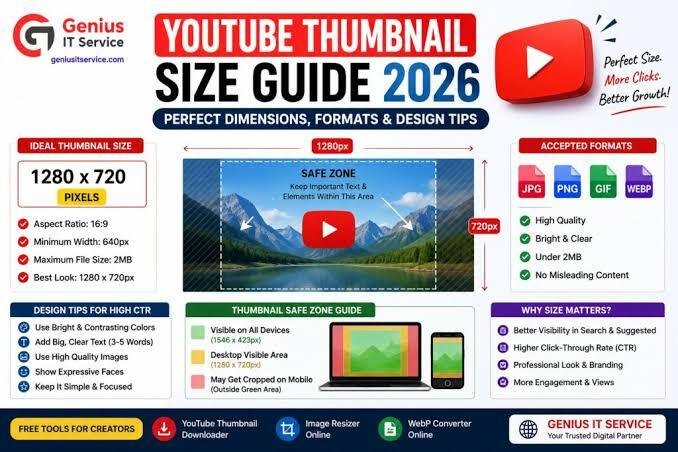
The golden rule: 1280 x 720 pixels.
Here are the complete specifications you need to follow:
| Specification | Requirement | Why It Matters |
|---|---|---|
| Dimensions | 1280 x 720 pixels | Ensures sharp display on all screen sizes |
| Aspect Ratio | 16:9 | Matches YouTube’s standard video player |
| File Size | Under 2 MB | Prevents upload issues and excessive compression |
| File Types | JPG, PNG, or GIF | Standard formats supported by YouTube |
| Minimum Width | 640 pixels | Prevents pixelation if scaled up |
Creating your thumbnail at 1280 x 720 pixels provides a high-resolution image that can be scaled down for smaller screens without losing clarity . While YouTube accepts a minimum width of 640 pixels, using the larger recommended size is crucial for maintaining quality .
Pro Tip: PNG files are often recommended for thumbnails with text or graphical elements because they tend to retain clarity better than JPGs .
Why Thumbnails Matter for Video Success
Thumbnails serve as visual book covers for your videos. They are often the primary factor in a viewer’s decision to click, carrying more weight than the title itself in the browsing process .
The Click-Through Rate Connection
Your thumbnail directly impacts your video’s Click-Through Rate (CTR) —a key metric YouTube’s algorithm uses to gauge audience interest. A higher CTR signals that viewers find your content appealing, which can lead to the algorithm promoting your video more aggressively in “Suggested” and “Browse” feeds . Videos with higher CTRs are more likely to be surfaced to a wider audience . Even a fractional improvement in CTR can snowball into significant traffic gains .
Compounding Benefits
An effective thumbnail doesn’t just get you one click; it creates a virtuous cycle:
- An eye-catching thumbnail leads to a higher CTR.
- YouTube’s algorithm interprets this as a sign of a high-quality video.
- The video is recommended to more viewers.
- More views generate more watch data, further boosting the video’s reach .
Creators like MrBeast are known for investing heavily in thumbnail iteration, sometimes designing 20-30 variations before publishing a single video .
Best Practices for Designing Click-Worthy Thumbnails
Follow these best practices to create thumbnails that grab attention and encourage clicks.
1. Use High-Contrast and Bright Colors
In a busy YouTube feed, you need to stand out. Using contrasting colors, particularly for graphics and text, will immediately draw the eye . Bright colors also naturally attract attention, making your video more noticeable at a glance . A study by Netflix found that color contrast was one of the biggest predictors of click behavior on streaming thumbnails . Subtle tweaks to increase saturation can make your image pop without looking unnatural .
2. Feature Faces and Emotion
Human faces are one of the most powerful tools in thumbnail design. Our brains are naturally wired to pay attention to faces and assess emotional states . An expressive face—showing surprise, excitement, or curiosity—can entice viewers to click to find out what’s happening . Eye-tracking research shows that faces capture attention almost immediately . A close-up shot of a face with a genuine, contextual reaction is more effective than an over-the-top, clickbait-y expression .
3. Keep Text Minimal and Bold
If you use text on your thumbnail, it should be short, concise, and highly readable . Use one to three impactful words rather than full sentences . Ensure the font is large enough to be read easily when the thumbnail appears small in search results or the “Up Next” section . A minimalist approach often works best in a sea of cluttered designs .
4. Maintain Consistent Branding
Establishing a recognizable brand on YouTube starts with consistency in your thumbnails . Using a uniform style, color scheme, or including your logo helps viewers instantly identify your content, building trust and recognition over time . MrBeast’s thumbnails are a prime example of consistent branding that makes his videos instantly recognizable .
5. Be Honest and Accurate
Your thumbnail should provide an honest representation of what your video contains . Misleading thumbnails—or “clickbait”—can lead to viewer frustration, a poor user experience, and damage to your channel’s reputation . A thumbnail that aligns with your content will build trust with viewers and lead to better long-term engagement .
6. Take High-Quality Still Images
If you’re using a photograph for your thumbnail, don’t just take a paused frame from your video. The quality is often too low and the expression awkward . Instead, stage and take a real, high-quality photograph that looks professional . For a strong composition, consider the “rule of thirds” where the subject occupies one-third of the image .
Proven Thumbnail Formats That Drive Clicks
Certain thumbnail formats consistently perform well. Here are some of the most effective types you can test for your videos :
- The Burning Question: Pose a question that taps into the viewer’s curiosity or concerns. For example, “WHERE DID EVERYONE GO?” over a photo of an abandoned building.
- Facts and Stats: Use a bold, specific number to immediately convey the stakes or result of the video, such as “$0 to $100K.”
- Before-and-After: Showcase a dramatic transformation to prove the video is worth watching. This is effective for makeovers, renovations, or “how-to” content.
- “Versus” Comparison: Compare two items or ideas head-to-head. This is a clear and compelling format for product reviews, gaming, or any type of comparison content.
- Quotes or Sound Bites: Use a provocative quote or “sound bite” from the video to give viewers a preview of what they’ll hear. A bold contradiction works well.
- High-Energy Action Shots: For action-packed videos, use a screen capture of the most exciting moment, edited to look bold and colorful.
- Featured Products: If you’re reviewing a product, show a close-up of it. This helps viewers decide quickly if the video is relevant to them.
- Emotional Moments: A touching moment, like an act of kindness, can be very powerful in grabbing a viewer’s attention.
- Tutorial/How-to: Show the result of the tutorial, adding a bit of humor or showcasing the experience, rather than just showing the process.
Top Free Tools for Creating Thumbnails
You don’t need expensive software to create professional-looking thumbnails. Several excellent free tools can help you design stunning images.
1. Canva
Canva is one of the most popular online graphic design tools and is excellent for creating YouTube thumbnails . It offers a vast library of professionally designed templates, fonts, stock images, and illustrations, many of which are available for free . It’s incredibly user-friendly, even for those with no design experience . Canva also has a dedicated YouTube Thumbnail template that is pre-sized to 1280 x 720 pixels, making the design process effortless .
2. Pixlr
Pixlr is a powerful, browser-based design tool that offers a free YouTube Thumbnail Maker . It features an intuitive, layer-based interface that allows for precise editing and customization . You can choose from a wide range of pre-designed templates or start from scratch . Key features include smart resizing, customizable text effects, and a live preview, allowing you to perfect your design before downloading . Pixlr makes it simple to create high-quality thumbnails tailored to YouTube’s specifications .
3. Fotor
Fotor is an all-in-one photo editing and graphic design tool that’s available across web, desktop, and mobile . It’s known for being easy to use while offering a full suite of powerful features, including AI-powered tools like a background remover and image enlarger . This makes it simple to create professional-looking thumbnails quickly.
4. Adobe Spark Post
Adobe Spark Post is a strong option for those familiar with Adobe’s ecosystem or users wanting professional-grade features . It offers numerous templates, fonts, and composition tools and integrates with Adobe Creative Cloud . While there is a free version, it includes a watermark on your designs .
5. FotoJet
FotoJet is a great online design tool that is perfect for casual users who want to avoid creating an account . It provides a wide selection of YouTube thumbnail templates, clipart images, and fonts . You can use it for free without registering, making it a fast and convenient option for quick designs .
6. Open-Source Options
For tech-savvy creators seeking a no-frills, completely free tool, there are open-source options available on platforms like GitHub. These tools, such as a “Free Thumbnail Generator,” allow for quick creation of thumbnails without watermarks, signups, or ads . They often feature drag-and-drop uploads, text customization, and auto-resizing to the ideal 1280 x 720 pixels .
Using YouTube’s “Test & Compare” Feature (A/B Testing)
YouTube’s native “Test & Compare” feature is a game-changer for thumbnail optimization. This built-in tool allows you to upload up to three different thumbnails for a single video, and YouTube will split-test them to see which one performs best .
How to Use It
- When uploading a video, navigate to the “Test & Compare” feature under Video Details .
- Upload two or three different thumbnail options .
- YouTube will show the different thumbnails to viewers.
- After the test, analyze your report to see which thumbnail had the highest “Watch time percentage,” which is the metric YouTube uses to determine the winner .
When to Test
- New Videos: The launch window (first 24-72 hours) is the best time to test because impressions are concentrated and the algorithm is responsive to early signals .
- Evergreen Content: Testing older videos can be effective, but it requires more patience. With lower daily impressions, it may take weeks to gather enough data for a statistically significant result .
What to Test
Consider experimenting with these key variables :
- Face Prominence: Does a close-up or a medium shot perform better?
- Color and Contrast: Test a dark background against a bright, saturated one.
- Text: See if a video performs better with or without text, or compare different phrasing.
- Intrigue vs. Clarity: Does a mysterious thumbnail or a clear, descriptive one get more clicks?
Common Thumbnail Mistakes to Avoid
- Too Much or Too Small Text: If text can’t be read at a glance, it’s ineffective. Stick to a concise phrase and use large, bold fonts .
- Misleading Images: Using a stock photo or an unrelated image that doesn’t represent your content will damage viewer trust and engagement .
- Cluttered Designs: Avoid overcrowding your thumbnail with too many elements. A clean, focused composition is almost always more effective .
- Low-Resolution Images: Never use a small image and try to enlarge it. This will result in a blurry, unprofessional-looking thumbnail .
FAQ
What is the best YouTube thumbnail size in 2026?
The best size remains 1280 x 720 pixels with a 16:9 aspect ratio. This is the official YouTube recommendation to ensure your thumbnail looks sharp across all devices .
What is the file size limit for YouTube thumbnails?
The file size must be under 2 MB . A larger file can cause upload errors or result in YouTube compressing the image, reducing its quality .
What file formats does YouTube accept for thumbnails?
YouTube accepts JPG, PNG, and GIF formats . PNG is often preferred for images with text or graphics as it maintains better clarity .
How do I design a thumbnail that gets more clicks?
A clickable thumbnail typically features high-contrast colors, a compelling face with a clear emotion, minimal and bold text, and honest representation of the video content . Maintaining a consistent branding style also helps build recognition .
What are the best free tools to make a YouTube thumbnail?
Canva is a highly popular and user-friendly option with many free templates . Pixlr offers a powerful free thumbnail maker with layer-based editing . Fotor is another excellent all-in-one tool with AI features . For a quick, no-account-required tool, try FotoJet .
Can I A/B test my thumbnails on YouTube?
Yes. YouTube has a built-in feature called “Test & Compare” that allows you to upload up to three thumbnails and test them against each other to see which performs best .
Should I put text on my YouTube thumbnail?
Yes, but keep it to a minimum—one to three large, bold words are usually enough . The text should be easily readable and serve as a concise hook that complements the visual .