Best AI-Powered YouTube Thumbnail Generators for Faster Workflow
The thumbnail is your video’s first impression—and often the deciding factor between a scroll and a click. Studies show that 90% of top-performing YouTube videos use custom thumbnails . But creating high-CTR thumbnails traditionally requires design skills, time, and multiple tools. AI-powered generators have changed the game.
Here’s a curated look at the best AI-powered YouTube thumbnail generators that can supercharge your workflow.
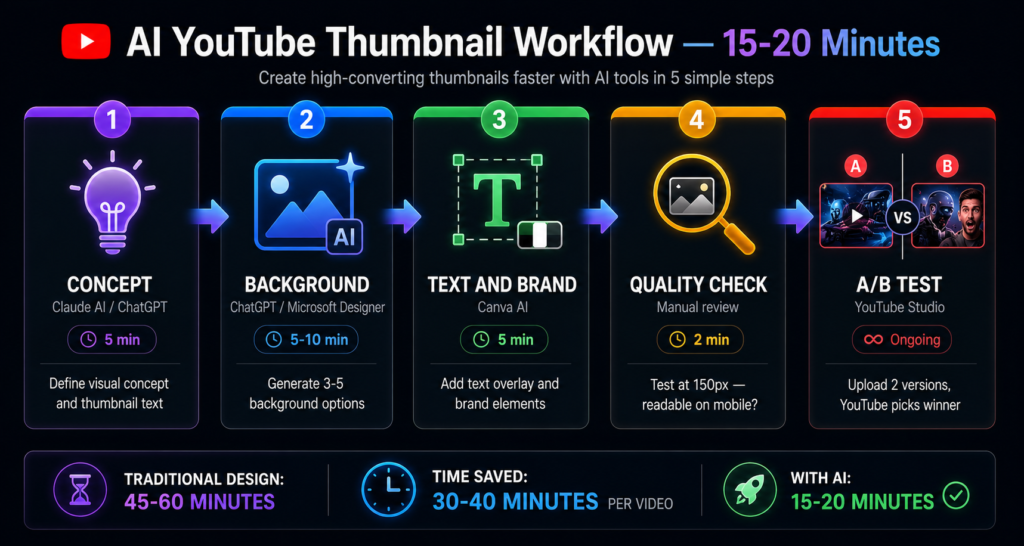
Top AI Thumbnail Generators for Creators
1. Adobe Express AI Thumbnail Generator
Adobe Express brings enterprise-grade AI to creators through Adobe Firefly. Simply describe what you want in the prompt field (start with five words or more), and the tool generates four results per generation . Upload reference images to guide style and composition, then continue editing with Adobe’s full suite of design tools including cropping, opacity adjustment, and filter effects .
Best for: Creators who want professional-quality results with deep editing capabilities.
Pricing: Each generation costs one generative credit; free account required.
2. Thumby
Thumby stands out with its face-centric AI engine that analyzes uploaded photos and positions faces as the visual focal point, automatically enhancing expression, lighting, and contrast . Creators can choose from over 20 design presets tailored to different YouTube styles—gaming, vlogs, tech reviews, reaction videos, and lifestyle content .
The workflow is streamlined: upload a face photo, describe your style and text, select content category and mood, choose output size, and hit generate . It supports multiple formats including 16:9 for YouTube, 9:16 for Shorts and TikTok, 4:5 for Instagram, and 1:1 for general use .
Best for: Creators who want face-focused thumbnails with multiple format options.
Pricing: Credit-based system with various packs available.
3. Thumbnail Maker AI – Pro
This app leverages GPT-Image and Gemini AI to generate thumbnails optimized for maximum click-through rate . The 30-second workflow lets you describe your video, optionally upload a reference face photo, and download the result—no templates or design skills required .
Beyond thumbnails, it includes built-in creator tools: AI-powered video titles, descriptions, tags, and prompt enhancer to transform simple ideas into stunning visual concepts .
Best for: Creators who want an all-in-one package including SEO tools.
Pricing: Free to start; various subscription tiers from Lite to Yearly.
4. Gen AI: Thumbnail Maker
Gen AI prioritizes consistency—a major pain point for AI image generation. Upload up to three reference images per generation to maintain consistent objects, products, and styles across your thumbnails . This is particularly valuable for creators who want recognizable branding across their channel.
The tool offers creator templates and produces premium-quality AI results. Five free image generations are available for lifetime use before needing a subscription .
Best for: Creators who need consistent branding across multiple thumbnails.
Pricing: 5 free lifetime generations; Pro subscription $19.99/month or $149.99/year.
5. Thumbnail Creator for YouTube
This app offers a hybrid approach: both AI generation and manual editing. The AI generator lets you start from text prompts, existing thumbnails, selfies, or photo library imports—then generate multiple versions . The standard editor provides full control with saved projects, templates, background removal, 300+ fonts, and access to Unsplash’s million+ photo library .
Best for: Creators who want AI speed plus manual control.
Pricing: Various in-app purchase options.
6. Viral Thumbnail Maker
A straightforward tool that generates thumbnails instantly based on video descriptions. Choose from multiple style options including Bold, Energetic, and Professional, with various color schemes and niches . The app maintains a generation history to track your creations and exports in high quality optimized for YouTube.
Best for: Quick, no-fuss thumbnail generation for all creator types.
Pricing: Monthly Premium at 5.99€.
AI Thumbnail Workflow Strategies
The “Reality-First” Approach
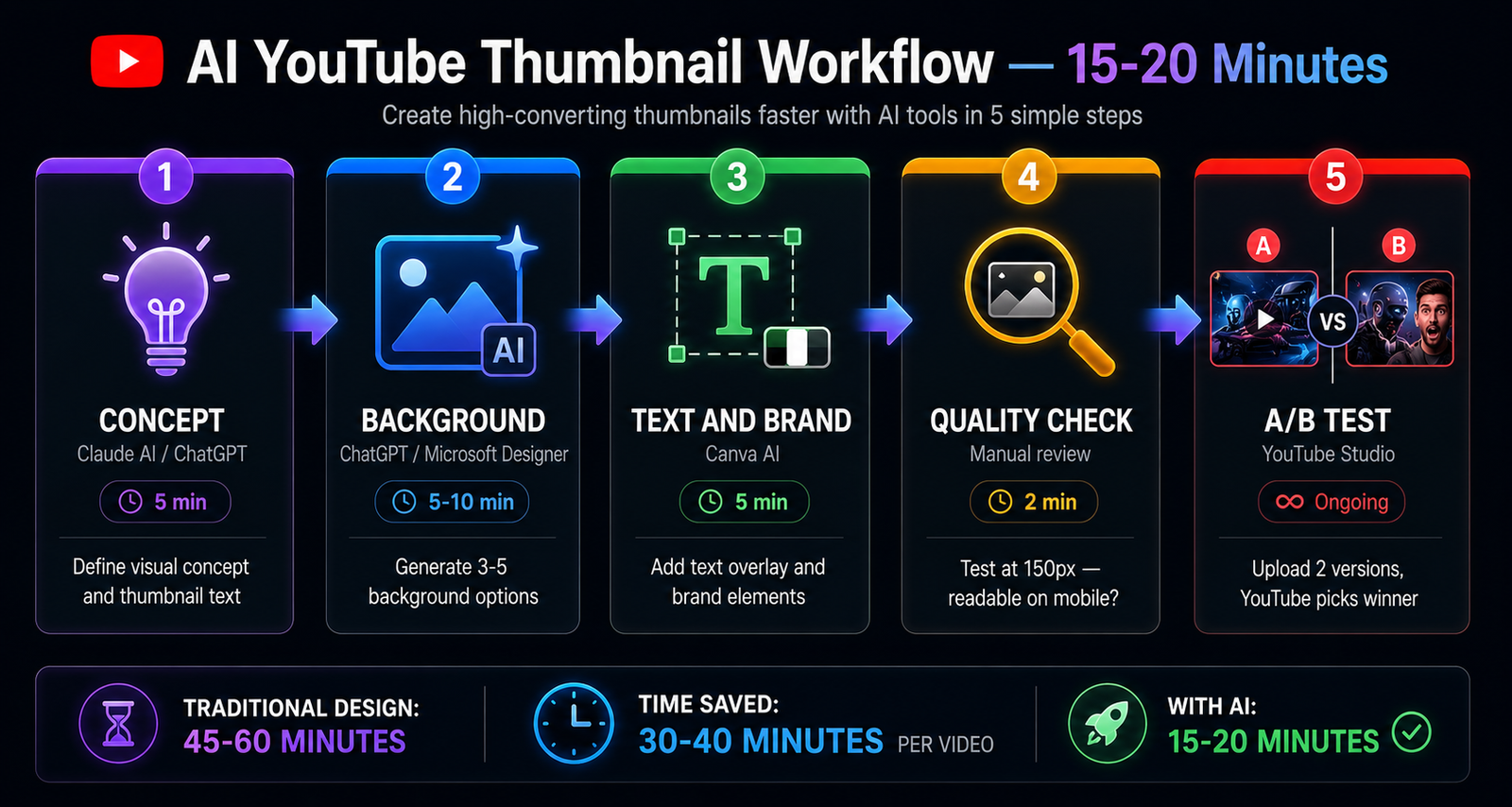
A LinkedIn post by creator Uzair Ali Zahid highlights a common problem with AI thumbnails: AI “imagines” too much. Instead of text-to-image, creators need image-to-image editing . His solution uses a four-step logic chain:
- Vision Analyst: A vision model like GPT-4o analyzes uploaded photos for lighting, facial expression, and background “vibe”—extracting a color palette that matches reality .
- Platform Switch: Toggle between YouTube Mode (16:9) and Reels/Shorts Mode (9:16) with intelligent composition adjustments .
- Img2Img Engine: Uses image-to-image pipeline with denoising strength around 0.55—enhancing quality without changing facial structure .
- Smart Compositing: Programmatically adds high-contrast text to avoid AI’s notorious spelling errors .
The result? High-fidelity thumbnails that actually look like the creator.
The Video-First Workflow
Simon Høiberg offers an alternative philosophy: create the video first, then use AI to package it. His n8n workflow:
- Extract video + transcript
- ChatGPT generates thumbnail concepts using the transcript
- Custom Flux LoRA model generates thumbnails
- Optional text overlay and Photoshop touch-ups
This approach frees creators to focus on valuable content rather than constraining themselves to “clickbait” formats, letting AI handle the packaging .
Key Features to Look For
| Feature | Why It Matters |
|---|---|
| Face Preservation | Ensures thumbnails look like you, not a generic AI creation |
| Multi-Format Export | Creates thumbnails for YouTube, Shorts, Instagram, and more |
| Text Overlay | Adds click-worthy text without AI spelling errors |
| Reference Image Upload | Maintains brand consistency across thumbnails |
| Multiple Variations | Allows A/B testing of thumbnail designs |
| Context Analysis | Uses video content to generate relevant thumbnails |
Frequently Asked Questions
Do I need design skills to use AI thumbnail generators?
No. Most AI thumbnail generators are designed for creators without design backgrounds. Simply describe your video or upload reference photos, and the AI handles the visual composition . Some tools like Adobe Express offer further editing capabilities for those who want more control .
Can AI-generated thumbnails actually improve click-through rates?
Yes. AI generators are often tuned for high-CTR design principles—bold composition, vibrant colors, and attention-grabbing layouts . Some tools specifically market themselves as “growth tools” rather than design tools, emphasizing their focus on viewer engagement . However, results vary by content type and audience.
What if I want to use my own face in the thumbnail?
Most AI thumbnail generators support face uploads. Apps like Thumby specifically optimize face-centric designs with automatic enhancement of expression, lighting, and contrast . The “Reality-First” workflow approach ensures the AI enhances rather than distorts facial features .
Are these tools free?
Many offer free trials or limited free generations. Adobe Express requires generative credits . Gen AI offers 5 free lifetime generations . Viral Thumbnail Maker and others use subscription models or in-app purchases . Check pricing before committing.
Can I use AI to redesign existing thumbnails?
Yes. Apps like Thumbnail Maker AI – Pro include “AI Redesign” features that transform existing YouTube thumbnails into high-CTR versions with one tap . Thumbnail Creator for YouTube also allows starting from existing thumbnails .
How do I choose between AI generation and manual editing?
Use AI generation for speed, inspiration, and when you need multiple variations quickly. Use manual editing when you need precise control, branded elements, or when AI results don’t match your vision. Some apps offer both modes .
Is it worth building custom thumbnail AI tools?
For serious creators, custom micro-apps tailored to specific workflows can save significant time—one creator reported saving roughly 5 hours of work in a single week . The trend toward “AI operating systems” suggests winning creators will increasingly build custom solutions rather than relying solely on generic tools .
Quick Comparison Table
| Tool | Best For | Key Feature | Starting Price |
|---|---|---|---|
| Adobe Express | Professional editing | Full Adobe suite integration | Free account |
| Thumby | Face-focused designs | 20+ presets, multiple formats | Credit-based |
| Thumbnail Maker AI | All-in-one | Built-in SEO tools | Free to start |
| Gen AI | Brand consistency | Reference image consistency | Free trial |
| Thumbnail Creator | Hybrid workflow | AI + manual editing | In-app purchases |
| Viral Thumbnail Maker | Quick generation | Style options, history | 5.99€/month |
The best AI thumbnail generator for you depends on your workflow preferences, budget, and creative needs. Whether you prioritize face authenticity, brand consistency, or all-in-one SEO tools, these AI-powered solutions can dramatically reduce design time while improving your thumbnails’ click potential.