YouTube Thumbnail A/B Testing Tools Boost Your Views Instantly
Your thumbnail is the first thing viewers see—and often the only reason they click or scroll past. Yet many creators still rely on guesswork when choosing that crucial image. YouTube Thumbnail A/B testing removes the guesswork by letting real viewer data decide which design performs best.
This guide covers everything you need to know: what A/B testing is, the best tools available, how to run effective tests, and strategies to turn data into more views.
What Is YouTube Thumbnail A/B Testing?
A/B testing (also called split testing) means showing two or more thumbnail variations to different segments of your audience and measuring which one drives more engagement. Instead of hoping your thumbnail works, you let your viewers vote with their clicks and watch time.
YouTube’s native Test & Compare feature, rolled out to creators in 2024 and expanded in 2025, allows you to test up to three thumbnails or title-thumbnail combinations per video. The platform automatically determines a winner based on watch time share—not just click-through rate (CTR).
Why Watch Time Matters More Than CTR
YouTube prioritizes watch time over clicks because a high CTR thumbnail that attracts viewers who immediately leave is worse than a slightly less clickable thumbnail that keeps people watching. As YouTube explains: “Great thumbnails don’t just get viewers to click—they also help viewers understand what the video is about, so that they can make informed decisions about what to watch”.
| Thumbnail | Watch Time Generated | Share |
|---|---|---|
| A (Winner) | 5,500 minutes | 55% |
| B | 4,500 minutes | 45% |
Thumbnail A wins despite potentially lower CTR, because it attracts viewers who actually stay and watch.
Best YouTube Thumbnail A/B Testing Tools
1. YouTube Test & Compare (Free – Built-In)
YouTube’s native tool is the easiest starting point for most creators.
- Price: Free (requires YouTube Partner Program membership)
- Variations: Up to 3 thumbnails or title-thumbnail combos
- Metric: Watch time share
- Availability: Long-form videos only (not Shorts, Premieres, or made-for-kids content)
Pros: No extra cost, automatic winner selection, integrated into YouTube Studio.
Cons: Limited to watch time metric, no advanced segmentation, desktop only.
2. TubeBuddy (Paid – Advanced Testing)
TubeBuddy has offered A/B testing since 2017, providing more flexibility than YouTube’s native tool.
- Price: Legend plan ~$27/month (annual billing)
- Variations: Typically two per test
- Metrics: CTR, watch time, statistical confidence (95% confidence threshold)
- Features: Test thumbnails, titles, descriptions, and tags; segment results by subscribers vs. non-subscribers
Pros: More granular data, choose your success metric, deeper analytics.
Cons: Paid feature; VidIQ has no equivalent A/B testing capability.
3. ThumbnailTest.com (Dedicated Platform)
Built specifically for thumbnail and title experiments.
- Price: Starts ~$24/month
- Variations: Multiple, unlimited tests depending on plan
- Metrics: CTR, watch time, statistical significance
- Features: Works on both new and existing videos; detailed performance data
Pros: Purpose-built for testing; more flexible than YouTube’s native tool.
Cons: No free plan; learning curve for initial setup.
4. VidIQ (AI-Powered Analysis)
VidIQ offers thumbnail A/B testing with AI-driven design suggestions.
- Price: Paid plans (Max ~$39/month annual)
- Variations: Up to 3 thumbnails
- Metrics: CTR, watch time, AI composition scoring
Pros: AI analysis scores contrast, text readability, and composition before testing.
Cons: More expensive than TubeBuddy for advanced features; no A/B testing on lower tiers.
Quick Comparison
| Tool | Price | Variations | Key Metric | Best For |
|---|---|---|---|---|
| YouTube Test & Compare | Free | 3 | Watch time share | Beginners |
| TubeBuddy Legend | ~$27/mo | 2+ | CTR or watch time | Advanced optimization |
| ThumbnailTest | ~$24/mo | Multiple | CTR + watch time | Dedicated testing |
| VidIQ Max | ~$39/mo | 3 | CTR + AI scoring | Data nerds |
How to Run an Effective Thumbnail A/B Test
Step 1: Use YouTube’s Test & Compare (Quick Start)
- Upload your video in YouTube Studio.
- At the thumbnail step, select “Test & Compare”.
- Upload 2-3 different thumbnails.
- YouTube automatically rotates them to viewer groups.
- After the test (typically days to 2 weeks), the winner applies automatically.
Step 2: Design Meaningful Variations
Test one variable at a time for clear results:
- Facial expression: Excited vs. shocked vs. smirking
- Text overlay: With text vs. no text; short copy vs. longer copy
- Color palette: Bright vs. muted; warm vs. cool tones
- Composition: Close-up face vs. wide shot; with vs. without branding
Step 3: Know When to Test
| Scenario | Best Action |
|---|---|
| New high-visibility video | Test immediately at launch |
| Evergreen library video | Test later with patience (longer duration) |
| Low-traffic niche video | Skip testing |
| Time-sensitive/trending content | Skip testing |
Step 4: Interpret Results
- If using YouTube’s tool, the winner is based on watch time share, not CTR.
- Aim for tests that reach statistical significance—TubeBuddy requires 95% confidence before declaring a winner.
- Even a 0.5-2% CTR improvement can compound into massive traffic gains across hundreds of thousands of impressions.
Thumbnail Best Practices to Test
Face Prominence
Human faces rapidly capture attention—especially expressive ones. Eye-tracking research shows viewers fixate on faces almost immediately. Test different facial expressions: excitement, shock, curiosity.
Color and Contrast
Bright, saturated backgrounds—particularly reds, yellows, and blues—tend to outperform muted tones. A Netflix study on artwork testing found color contrast was one of the biggest predictors of click behavior.
Text Overlays
Use minimal, high-impact words (2-4 maximum). “Best Budget Camera” outperforms “Here Are the Best Budget Cameras for 2025” in thumbnail text. Test text vs. no text, or short copy vs. no copy.
Intrigue vs. Clarity
- Intrigue thumbnails spark curiosity (blurred objects, reaction shots, cliffhangers)
- Clarity thumbnails show exactly what’s inside (product images, tutorial outcomes)
Test which approach works better for your audience.
Branding
Test logo placement, size, and transparency. Consistent styling helps audience recognition, but over-branding can clutter the design.
Advanced A/B Testing Strategies
Test Subscribers vs. Non-Subscribers
With TubeBuddy, you can segment results to see if a thumbnail works better for your existing audience or new viewers. A thumbnail that wins with subscribers might not be optimal for attracting new viewers.
Refresh Evergreen Content
Older videos with steady traffic can benefit from thumbnail refreshes. Creators like Nick Nimmin have shown that swapping cluttered designs for high-contrast, simple versions can increase CTR by 2%, reviving daily views months after upload. In one extreme case, a thumbnail swap resulted in 978% more views.
Test Title + Thumbnail Combinations
YouTube’s Test & Compare now supports testing titles and thumbnails together. The combination that generates the highest watch time share becomes the default.
FAQs
1. What is YouTube thumbnail A/B testing?
YouTube thumbnail A/B testing lets you compare multiple thumbnail designs on the same video to see which one drives more views and watch time. YouTube’s native Test & Compare feature automatically picks a winner based on watch time share.
2. Is YouTube thumbnail A/B testing free?
Yes, YouTube’s built-in Test & Compare feature is completely free and integrated into YouTube Studio. Third-party tools like TubeBuddy and ThumbnailTest offer advanced features for a monthly fee.
3. How long does a YouTube thumbnail test take?
Most tests finish within a few days to two weeks, depending on how quickly your video accumulates impressions. YouTube may end a test early if a clear winner emerges.
4. Can I test thumbnails on existing videos?
Yes, you can test thumbnails on existing videos, but tests take longer because impressions are lower. Evergreen videos may take weeks or months to reach statistical significance. YouTube’s Test & Compare works for both new and existing long-form videos.
5. What’s the ideal YouTube thumbnail size?
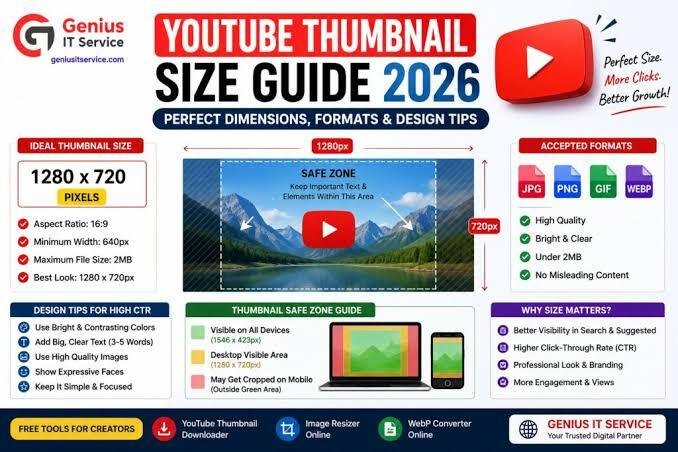
1280 x 720 pixels (16:9 aspect ratio), minimum 640 pixels wide. File size under 2MB, using JPG, PNG, or GIF formats.
6. Does VidIQ have A/B testing?
Yes, VidIQ offers thumbnail A/B testing on paid plans. However, TubeBuddy provides more advanced testing options at a lower price point. VidIQ’s strength is AI-powered design analysis and scoring.
7. What metric does YouTube use to pick thumbnail winners?
YouTube uses watch time share—the percentage of total watch time each variation generates—not click-through rate. This prevents clickbait thumbnails that attract clicks but lose viewers from winning.
8. Can I test titles and thumbnails together?
Yes, YouTube’s Test & Compare expanded in late 2025 to include title-thumbnail combination testing. You can test up to three combinations and the winner with the highest watch time share becomes default.
Final Thoughts
Thumbnail A/B testing transforms design from guesswork into a data-driven growth lever. Start with YouTube’s free Test & Compare feature to get comfortable with the process. As your channel grows, consider third-party tools like TubeBuddy for more granular control and advanced analytics.
Even a 1-2% CTR improvement compounds across your entire catalog—and that incremental growth can be the difference between a video that stalls and one that goes viral. Stop guessing. Start testing.